Choose the correct package
Use the authenticated DeskGate setup page for your organization. Select Cloud or On-Premise according to the license, then select the intended profile. Agent installs the endpoint service; Admin provides the administrator application; Portable is a separate package and is not a substitute for a managed Agent installation.
The current Agent installers select the payload matching the Windows architecture. Confirm operating-system support for your release before deployment.
Recognize the installed Agent
| Deployment | Agent service name | Native Program Files folder | Agent executable |
|---|
| Cloud | GoMyid | GoMyid | gomyid.exe |
| On-Premise | GoMyit | GoMyit | gomyit.exe |
The On-Premise GoMyit spelling is intentional. “Native Program Files” means the native system Program Files directory, not an assumed 32-bit folder. These are Agent paths, not server installation paths.
1. Set the On-Premise address
The On-Premise package requires a server IP address or DNS hostname. Enter the host only, without https://, a URL path or an appended port. The setup page accepts one endpoint, or two different endpoints separated by a semicolon when your deployment uses that arrangement.
For example, desk-server.example.com illustrates a hostname format; it is not a working server address. Use only the endpoints assigned by your administrator. Configure the server’s actual ports through the supported deployment configuration, not by appending them to this field.
2. Download and install on a pilot device
- Confirm the organization, license and deployment shown on the setup page.
- Generate the Agent EXE or Agent MSI appropriate to your rollout method.
- Verify the downloaded file’s source and publisher before execution.
- Run the approved installer with authorized administrative elevation.
- Allow setup to complete and record any error message before retrying.
- Check the matching Agent service and verify the expected files.
Admin installation uses a separate profile and does not create the Agent service. If you installed Admin by mistake, obtain the Agent package for endpoint enrollment.
3. Verify connection and reporting
Check the matching service in Windows Services. Confirm that the endpoint can reach its configured server, then locate the device under the expected organization in the management interface. Review a recent record after the configured collection interval and confirm the relevant collection settings.
With current Agent MSI packages, an Installed Apps entry is not a reliable installation check on its own. Verify the service, installed files and console connection together. Use the package’s supported uninstall procedure when removal is required.
Verify the device in the management interface
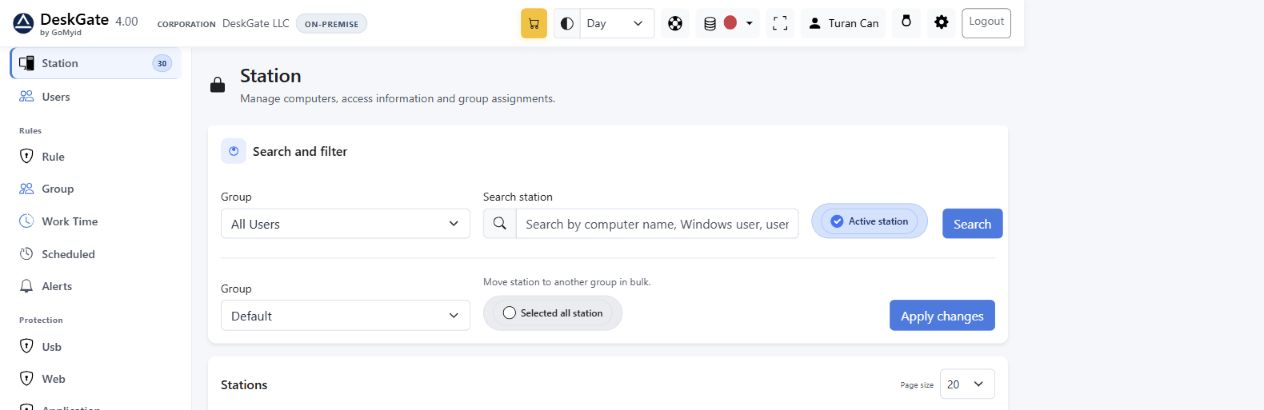 Actual Station filters used to find the installed endpoint. Open for original size. Example records are demonstration data.
After installing the Agent, open Station and search for the expected computer or Windows user. Confirm its organization and group. This is a post-installation verification screen, not an Agent installer wizard. Continue with From Your First Device to Your First Report.