DeskGate Help Center
DeskGate Employee Performance Monitoring
Use DeskGate activity reports in employee performance reviews while separating computer usage, task context and measurable business results.
Employee performance monitoring is most useful when it helps a team understand how work gets completed and what prevents people from doing it well. Computer activity contributes to that understanding, but it does not provide a complete evaluation of an employee. Application usage, active minutes, and recorded web activity describe observable interactions with a computer. Accuracy, judgment, customer outcomes, collaboration, and completed work require information from the business process itself. A reliable review keeps those sources connected without treating them as interchangeable.
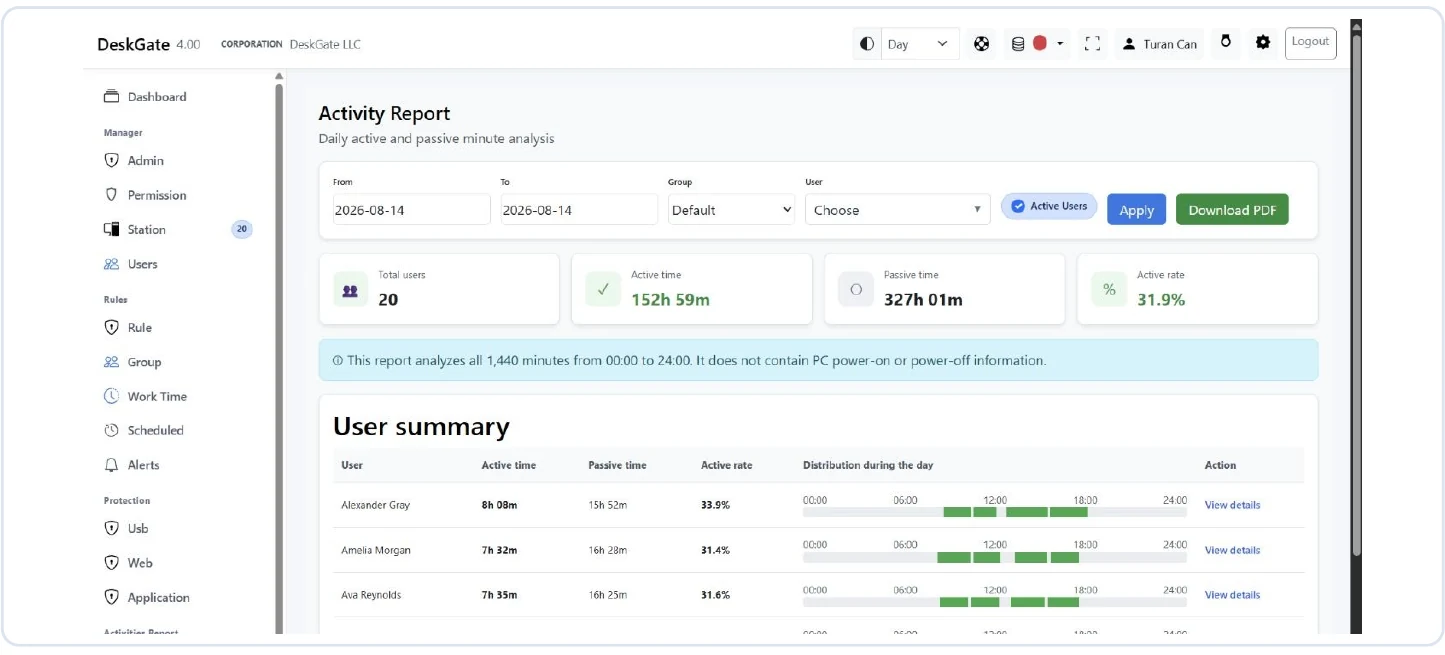
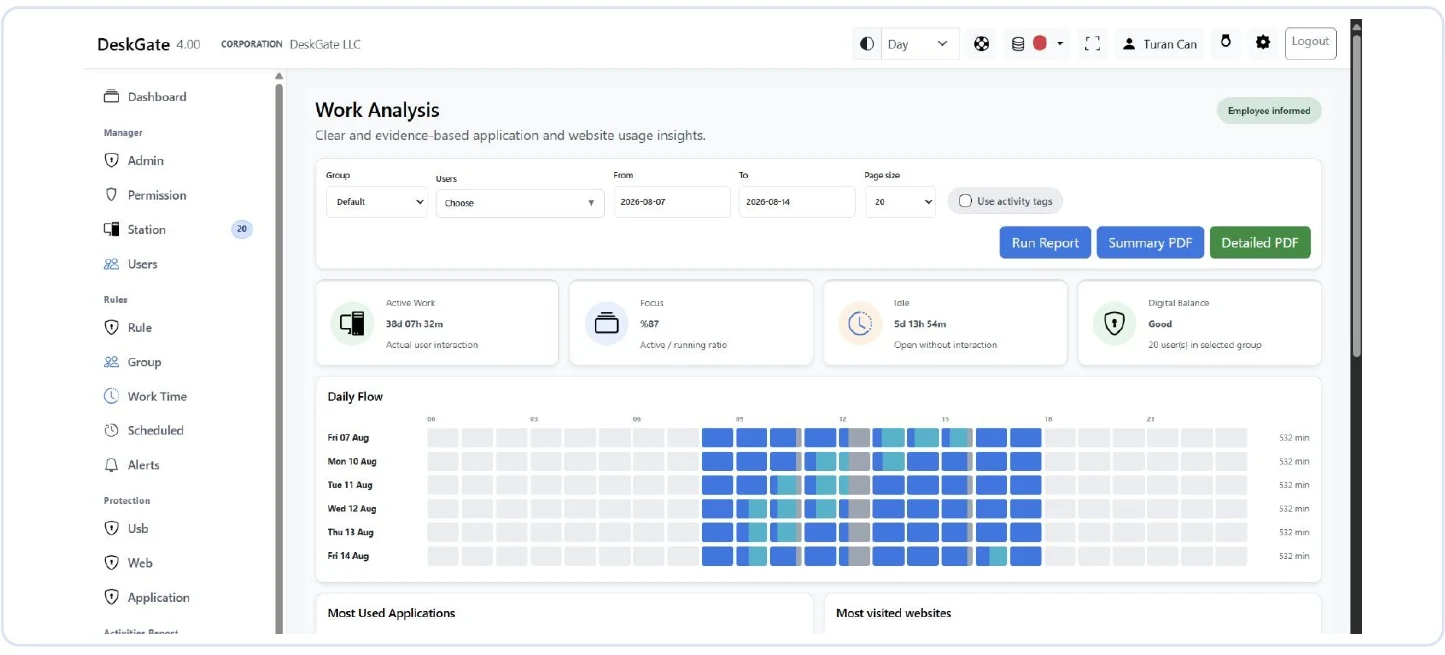
DeskGate provides reports for examining recorded computer usage across selected users and periods. Work Analysis helps reviewers examine application and web usage, while Daily Activity provides an active and idle time perspective. These reports can support focused questions about tools, workload, training, and changes in working practices. This guide explains how to build an employee performance monitoring process around those questions, verify the evidence, and reach conclusions that the underlying records can actually support.
Begin with a question about work
Define the decision before opening a report. A team may need to understand whether a new application is being adopted, why a recurring task takes longer, or whether a process change has reduced repeated work. Each question needs a different combination of evidence. Increased application usage may help establish adoption, but it does not establish that employees are completing tasks accurately. A shorter interaction period may indicate an easier workflow, yet it might also reflect a change in responsibilities. State the question precisely enough to identify what additional information will be needed.
Write down the intended outcome, the relevant computer activity measure, and the source that will confirm the business result. For an application transition, the activity measure might be recorded use of the new tool among the employees assigned to the transition. The business result might be successful completion of the same tasks without additional corrections. This written connection prevents the reporting process from drifting into collecting every available number. If a measure would not change any reasonable decision, reconsider whether it belongs in the review.
Separate activity from contribution
Computer interaction is only one part of many jobs. Reading a document, discussing a problem, planning a difficult response, or completing a task away from a workstation can involve limited interaction. Conversely, a long period of active computer use may include repetitive steps, correction of errors, or difficulty finding information. The amount of activity therefore cannot establish the value of the work. Treat activity as a description of how work appears in the available records, then investigate the relevant circumstances.
Avoid turning every difference into a ranking. Employees with similar titles may handle different assignments, support different customers, or cover different parts of a process. The more varied those responsibilities are, the weaker a direct comparison of computer minutes becomes. An employee who solves a problem quickly should not appear less effective merely because another person spent longer in the same application. Start with the role and its expected outcomes, and use recorded activity only where it helps explain those outcomes.
Establish the correct employee and device scope
A report is meaningful only when its user selection matches the work being reviewed. Confirm the relevant group and users before interpreting totals. Shared workstations, changes in account assignments, or an employee using more than one computer can complicate the relationship between a person and a record. DeskGate's station information can help administrators examine computer, Windows user, group, and last seen information. That technical context supports checking the scope; it does not replace an understanding of who actually performed a particular task.
Keep scope changes visible during recurring reviews. Someone joining a team halfway through a period should not be compared with a full period without an explanation. An employee changing responsibilities may belong to a different operational comparison even if the account remains in the same group. When a report seems to omit a person, check the selection and available pages before assuming that no activity exists. Resolving these questions early prevents an inaccurate identity or population assumption from shaping the entire discussion.
Choose periods that can be compared
Comparison requires more than selecting two dates. Check whether the periods include similar working arrangements, task types, and numbers of days. A week containing training or planned absence has a different context from a normal production week. A project moving from research to delivery can change application usage without any change in individual effectiveness. Describe these differences before deciding which measurements can reasonably be compared. When periods are materially different, separate them instead of forcing a single trend statement.
Record the starting and ending dates used in DeskGate and verify how the selected range appears in the resulting report. If a review is repeated, use the same interpretation of date boundaries and the same user scope. A change in the population can increase totals even when each person's activity remains similar. For a narrow question, a shorter and well-understood period may provide stronger evidence than a long period containing several unrelated changes. The goal is a comparison that another reviewer can reproduce and explain.
Read Daily Activity with its time basis intact
The Daily Activity report presents active and idle minutes against a full day of 1,440 minutes. Its existing screen explanation states that it does not provide PC power on and power off information. This matters because a full day total is not the same as scheduled working hours. Reading an idle portion as proof of absence, or using the report as a direct attendance record, would assign a meaning that the displayed measure does not establish. Keep the report's time basis visible whenever its numbers are discussed.
Before using a daily figure, confirm the employee, date, and relevant working context. An unusual value should lead to a question about the records and the work, rather than an immediate conclusion about effort. Meetings, work away from the computer, and technical collection conditions may all be relevant to interpretation. If attendance or payroll is the actual question, use the organization's appropriate attendance records and review process. DeskGate activity information may provide supporting context, but the Daily Activity view should not silently become a different type of record.
Use Work Analysis to investigate tool use
Work Analysis provides a way to examine application and web usage with group, user, and date filters. Begin with the distribution that relates to the performance question. If a task appears to require an unexpected amount of time in a particular application, narrow the review to the relevant users and period. The report can identify where a follow-up conversation would be useful. It cannot, from a duration alone, determine whether the time was necessary, whether the work was correct, or whether the employee had an avoidable problem.
Application and website labels also need context. A browser may be used for customer work, internal systems, research, or communication. A category that is not yet defined does not establish inappropriate activity. Ask the process owner how the tool is used and whether the current classification reflects the task. If a classification changes between reviews, document that change before comparing category totals. Otherwise, an apparent performance shift may be nothing more than a different way of grouping the same kinds of records.
Bring business outcomes into the review
Use the records already associated with the work to evaluate results. These may include completed requests, reviewed documents, accepted deliverables, corrections, or other measures chosen by the organization. DeskGate does not need to be treated as the source of every outcome. The reviewer can compare the computer activity perspective with the appropriate business records while keeping the origins of each observation clear. This separation makes the review more useful because each source is asked to answer the question it is suited to answer.
Do not assume a numerical relationship merely because two values changed together. More application time alongside more completed work may reflect higher demand. Less application time with steady output may reflect an easier workflow. A deterioration in quality might have a cause that computer usage does not reveal at all. State what is observed, identify possible explanations, and use the business process evidence to test them. When the available information does not distinguish between explanations, record that uncertainty instead of presenting a stronger conclusion.
Check data quality before discussing individuals
Unexpected gaps should first be reviewed as data questions. Confirm that the selected user and group are correct, that the relevant device appears as expected, and that the report period matches the intended review. A workstation's last seen information can help guide a technical check, but it should not be equated with an employee's arrival or departure. The absence of a record does not, on its own, establish the absence of work. Review the conditions under which the data would have been collected and made available.
If a technical issue is identified, separate the affected period from any performance conclusion. Do not fill missing intervals with assumed inactivity simply to produce a complete-looking chart. Explain which observations are usable and which remain unresolved. After the issue is corrected, a fresh period of reliable data may be more appropriate than trying to reconstruct unsupported detail. This approach protects the usefulness of the review and prevents collection problems from being attributed to the people whose work is being discussed.
Make the review conversation specific
Present an observation in neutral, concrete terms. Identify the relevant period, application, and scope, then ask how those records relate to the task. A statement about a recorded change is easier to examine than a broad judgment about an employee's attitude. Give the employee or process owner an opportunity to explain workload changes, interruptions, training, or dependencies. Their explanation can reveal facts that the report does not contain and can also identify a technical or classification issue worth correcting.
Keep the conversation focused on the original decision. If the question concerns a slow workflow, explore the steps that cause delay and what support would improve them. Do not expand into unrelated records merely because more data is available. At the end of the discussion, distinguish the agreed facts from open questions. Document any action and the reason for it in the organization's normal review process. A report is most useful when it contributes to an understandable next step rather than becoming a permanent collection of unexplained differences.
Choose actions that match the finding
Different findings require different responses. Difficulty using a tool may call for training. Repeated switching between systems may justify a process review. A technical interruption may belong with the support team. An unclear assignment may require a manager to explain priorities. None of these issues is resolved merely by asking an employee to increase active minutes. Choose an action that addresses the verified obstacle and state what improvement would look like in terms of the actual work.
Assign responsibility and a reasonable review point. If the change affects several people, explain who will coordinate it and which records will be used to evaluate the result. Keep that action record separate from any assumption that DeskGate automatically manages the business process. The reports provide evidence for the review; the organization remains responsible for implementing training, support, or operational changes. A small, specific intervention that can be evaluated is generally easier to learn from than several simultaneous changes with no clear connection to the original finding.
Verify improvement without changing the rules
When the review point arrives, recreate the relevant scope and check whether the measurement conditions still match. Compare the same kind of work and note any changes in staffing, demand, or tools. If the intervention was intended to remove repeated steps, inspect whether those steps have actually become easier and whether the resulting work remains accurate. A reduction in recorded usage is supportive only when the business result also makes sense. Improvement should be described through the outcome that motivated the intervention.
Avoid changing the definition of success after seeing the numbers. A plan intended to reduce unnecessary effort should not later reward longer application time. If circumstances require a different measure, explain the reason and begin a clearly identified comparison. Keep a record of what was changed, which evidence was reviewed, and what remains uncertain. This preserves continuity across reviews and allows the team to learn from changes that did not produce the expected result, without forcing every report into a positive performance narrative.
Share reports with their limitations
DeskGate Work Analysis includes summary and detailed PDF options. Choose the level of detail that answers the review question, and verify the selected users, dates, and available record limit before exporting. A detailed file is not automatically a complete record of every event. Open the resulting document and check a known item so that the recipient receives the intended scope. Include a short explanation of the measure and any important collection or comparison limitations when the report is shared.
Restrict distribution to the people who need the information for the stated purpose. An exported document can continue to circulate after access to the original reporting view changes, so use the organization's established storage and sharing arrangements. Recheck recipients when responsibilities change. Do not remove context simply to make a report shorter: the date range, population, units, and relevant qualifications are essential to its meaning. A concise report with clear boundaries supports a better decision than a large file whose coverage is misunderstood.
Handle disagreement with a reproducible review
A disputed interpretation should be examined through the same evidence standards as the original review. Recreate the filters, identify the specific observation, and ask which part is being questioned. The disagreement may concern the accuracy of a record, the employee and device association, or the meaning assigned to an accurate value. Those are different questions and may need different reviewers. Keeping them separate allows a technical correction to be handled without assuming that every concern is technical, or that every correct record justifies the conclusion drawn from it.
Preserve the context needed to understand the correction. If the original report used an incorrect date range, explain that error to the people who received the resulting conclusion. If the records were accurate but a task was misunderstood, update the interpretation rather than pretending the underlying numbers changed. Follow the organization's normal procedure for documenting the outcome and limiting further circulation of an inaccurate assessment. A correction process is part of maintaining useful reporting, not an exception that weakens the value of the tool.
Recurring disagreements can also reveal a weakness in the review method. A measure may be too ambiguous, a category may be poorly explained, or the task context may be consistently omitted. Address that pattern before repeating the same evaluation. The aim is an assessment that people can understand and examine, with clear boundaries between recorded facts, business context, and managerial judgment.
Maintain a fair and useful monitoring practice
Explain what computer information is reviewed, why it is relevant to the work, and how employees can raise questions about an interpretation. Keep access appropriate to responsibilities and review it when people change roles. The organization should establish its own requirements for notices, retention, and handling concerns with the responsible specialists. These operating decisions are part of a sound monitoring practice; a software installation alone does not settle them. Clear expectations make reports easier to discuss and reduce avoidable uncertainty about their purpose.
Revisit the process as roles and tools change. Retire measures that no longer help answer a useful question, and update the interpretation of measures whose context has changed. Employee performance monitoring works best when it connects reliable observations with practical support and business outcomes. DeskGate contributes a structured view of recorded computer activity. Used with accurate scope, comparable periods, and informed review, that view can help managers understand obstacles and evaluate improvements while keeping the limits of computer activity evidence visible.