DeskGate Help Center
DeskGate Employee Activity Reports
Choose and validate DeskGate employee activity reports, understand active and passive minutes, and prepare useful reporting routines.
Employee activity reports turn recorded computer information into something a reviewer can examine, explain, and use in a decision. A useful report has a defined audience, a clear period, and an understood relationship to the work being discussed. Without those details, even accurate numbers can be misunderstood. A manager may read a usage total as an attendance record, while an administrator may investigate a difference that comes from two reports measuring different things. Good reporting begins by making the meaning of the information explicit.
DeskGate provides several ways to review computer activity, including Work Analysis and Daily Activity. This guide focuses on building a dependable reporting routine around those views. It covers choosing the report, setting its scope, checking the result, preparing an export, and communicating findings. The objective is a report that another authorized reviewer can reproduce and understand, rather than a collection of unexplained charts. The same method works for a focused daily check and a broader weekly review.
Match the report to the requested decision
Begin with the decision the recipient needs to make. A request about which applications a team uses belongs in a different report from a request about the daily distribution of active and passive minutes. Work Analysis helps examine recorded application and website usage. Daily Activity presents a time-based activity perspective. Historical screen recordings answer a more specific question about visible activity within a received recording; they are not a substitute for either report's numerical summary.
Write a short description of what the selected report can establish. For example, a usage review may show that an application appears in the recorded activity of the selected users during the chosen period. That statement is narrower and more useful than claiming that the report proves successful adoption of a business process. Completion, accuracy, and customer outcomes require their own evidence. Keeping the reporting question precise helps the recipient distinguish a recorded observation from a conclusion that still needs checking.
If a request combines several questions, prepare separate views with a shared explanation. Do not force unlike measurements into a single total merely to make the report shorter.
Establish a reporting brief before collecting results
A reporting brief can be a short note maintained by the person preparing the review. Record the purpose, intended audience, relevant group, selected users, date range, and report name. Add the expected delivery date and the person responsible for checking the result. These details provide continuity when reporting responsibilities change or when someone asks why a particular employee was included. They also keep recurring reports from expanding quietly into unrelated areas of computer activity.
Define the level of detail the audience actually needs. An operational meeting may require a short explanation of a pattern and an agreed follow-up action. An administrator investigating a missing record may need the exact filters and a narrowly scoped export. Sending the same detailed document to both audiences can create unnecessary work and expose information that is irrelevant to the decision. Choose the detail deliberately rather than treating the fullest available export as the default deliverable.
Revisit the brief when the business question changes. A report originally prepared to check a software transition should not automatically become an ongoing individual assessment without a fresh review of its purpose and scope.
Keep user and group selections reproducible
The people visible in a report should match the people described in the brief. Check the selected group and users before interpreting any totals. A team name alone may not explain whether the scope includes temporary staff, employees who recently transferred, or accounts used on shared computers. Record the selection clearly enough that another authorized person can repeat it. When a group changes between reporting periods, explain that change alongside the comparison.
User identity and computer identity deserve separate attention. One employee may work on more than one computer, and a shared workstation may appear in records associated with different Windows users. DeskGate station information can help administrators review computer names, users, groups, and last-seen details. Use that information to investigate a mismatch, while checking the organization's actual device assignments. A current assignment does not necessarily explain who used a computer during an earlier period.
Do not repair an unexpected total by silently removing a user. First establish why the record is present or missing. If the review scope is corrected, document the correction so the recipient understands why the replacement report differs from the earlier one.
Choose dates that represent a complete comparison
Date selection shapes the meaning of every activity report. A complete week and an unfinished week are different reporting periods even if they appear beside each other in a presentation. Decide whether the review concerns a finished calendar period, a particular operational interval, or activity available up to the time of preparation. State that choice in the accompanying explanation. Avoid presenting partial data as a completed period simply because the current date is included in the filter.
For distributed teams, establish how the dates displayed in the installed environment relate to the working periods under review. Check a known event when a boundary seems unexpected. Do not assume that every source used in a meeting applies the same date convention. Business records, employee schedules, and computer reports may organize events differently. A difference around the end of a day requires verification before it is treated as a missing record.
Keep comparison periods similar in length and context. Holidays, role changes, project deadlines, and training days can explain differences that a raw total cannot. Note relevant conditions without claiming that the activity report independently proves their effect.
Prepare the Work Analysis view
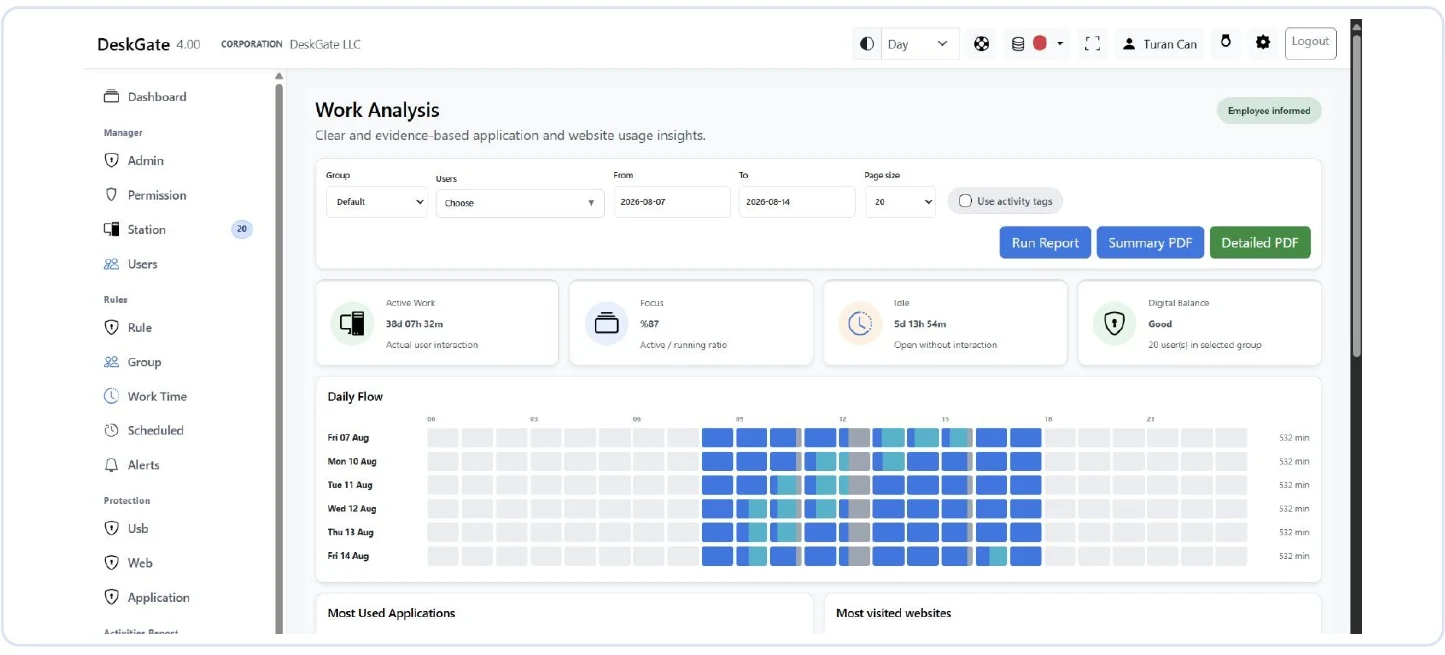
Open Work Analysis when the question concerns recorded applications and websites. Select the intended Group and Users, then set From and To for the reporting period. Choose the appropriate page size and run the report with Run Report. After changing filters, confirm that the displayed result belongs to the new selection before discussing it. A filter visible on screen should not be assumed to have refreshed every result until the report has been run as intended.
Read the overview together with its supporting detail. Application usage, website usage, active work, idle time, and user comparisons describe related aspects of recorded activity, but they are not interchangeable measurements. If an overview appears surprising, locate a relevant user or detailed record before offering an explanation. Checking one recognizable entry helps establish that the report refers to the expected account, period, and type of activity.
Use the classifications and definitions supplied by the installed interface. An undefined category is an unresolved classification, not automatic evidence of personal browsing or poor performance. If classification affects the conclusion, have the responsible reviewer examine that question before distributing a confident summary.
Read Daily Activity on its stated basis
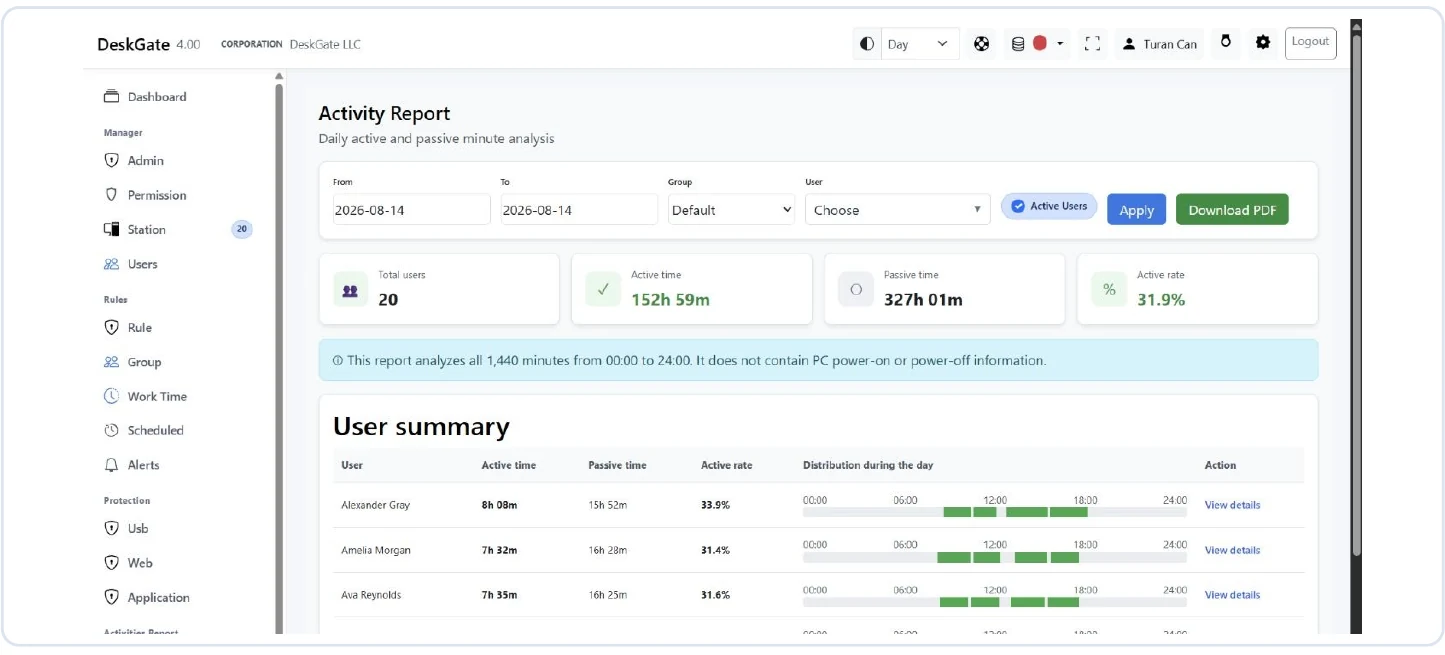
The Daily Activity report considers all 1,440 minutes from 00:00 to 24:00. Its notice states that it does not contain PC power-on or power-off information. This distinction belongs in the reporting explanation whenever the audience might otherwise interpret the figures as working hours. The report provides an active and passive minute perspective across a full day; it does not independently establish attendance, paid time, or the completion of assigned duties.
On Activities, choose From, To, Group, and User for the required scope. Review the Active users checkbox because it affects which users are included; it is not the same thing as the active-minute total. Select the page size and use Apply. Read the total users, active time, passive time, active rate, and individual rows together. The summary becomes easier to interpret when its population and daily basis are understood.
A quiet interval can require context about a meeting, a task away from the computer, or incomplete collection. Record the limitation rather than converting all passive minutes into a claim about the employee. Use Work Analysis when the next question concerns particular applications or websites.
Check completeness before interpreting a pattern
A successful report request does not guarantee that every expected record is represented. Confirm that the selected users appear, that the dates are appropriate, and that the result contains recognizable activity where activity is expected. Check the collection and access context when information is missing. A device that has not been seen recently may require a technical investigation, but its current status alone does not explain every historical interval in the report.
Separate an empty result from a zero measurement. An empty view may reflect a filter, an excluded user, insufficient access, or unavailable records. A displayed zero belongs to the report's own definition and still needs appropriate context. Those situations should not be described with the same sentence in a management update. State what the system displayed and what was checked, then identify any remaining uncertainty.
Use a small verification case before reviewing a large population. Choose a known user and date, confirm the relevant activity, and then widen the scope. This approach makes it easier to locate a filtering problem than changing several settings while looking at a broad company total.
Treat pagination and export limits as part of the scope
The rows visible on one page may represent only part of the filtered result. Review the page controls and move through the relevant pages before claiming that a particular user or record is absent. Changing page size changes how much is displayed at once; it does not necessarily change which underlying records match the filters. Keep that distinction clear when explaining why a screenshot contains fewer entries than the result described in a report.
Work Analysis provides Summary PDF and Detailed PDF choices, with a PDF record limit that needs review. A detailed export may be limited per entity. Select the output that fits the purpose and confirm the limit before using the document as evidence of a complete history. A document can be valid for its selected scope while still being unsuitable for a request that requires every matching record.
When a limit affects the delivered material, explain it in the reporting note. Do not silently join several overlapping exports and present their combined totals as a single system calculation. If a narrower set of periods is necessary, keep the boundaries explicit and check for omissions or overlap.
Build a short daily review routine
A daily review is most effective when it answers a few operational questions consistently. Confirm that expected users and relevant activity are represented, examine any known issue requiring follow-up, and record whether a technical investigation is needed. The purpose is usually to identify something that should be checked while the context is still available. It does not require a detailed evaluation of every employee on every day.
Prepare the daily view at a defined point in the reporting cycle and state whether the day is complete. Compare unexpected results with the reporting brief before escalating them. A user may be outside the selected group, an active-user filter may exclude an account, or the requested date may be wrong. Resolving those basic checks first makes an escalation more useful to the person who receives it.
Keep the daily note concise: describe the observation, the checks already performed, and the next owner. An unresolved issue should remain an unresolved issue, rather than becoming a repeated statement of fact each time the report is forwarded. Close the follow-up when its explanation has been verified.
Use weekly reports to explain changes
A weekly review can bring related daily observations into a clearer operational picture. Start with the same scope definition used in previous periods, then list any changes in users, responsibilities, or collection coverage. Review the week as a whole before selecting a notable day. An isolated peak can be relevant, but it should not become the entire explanation of a period without examining the surrounding records and work context.
Focus the weekly discussion on changes that merit action. A new application appearing in the selected team's usage may justify checking how the transition is progressing. Repeated uncertainty about a user's records may justify reviewing device assignments or collection settings. These are different kinds of follow-up and should be assigned to the appropriate owner. The report supplies observations; the team supplies the operational context needed to decide what to do.
Carry forward open questions with their status, not just their original wording. Note whether a technical check is pending, whether the scope was corrected, or whether the issue was resolved. This prevents the weekly report from becoming an accumulating list of unexplained concerns.
Validate the document that will actually be shared
An export should be checked as a separate deliverable. For Daily Activity, use Download PDF after applying the intended filters. For Work Analysis, choose the suitable Summary PDF or Detailed PDF option after reviewing the available scope and limits. Open the resulting file and verify the people, dates, report type, and a recognizable record against the on-screen result. A successful download confirms file creation, not that the document answers the recipient's question.
Review the visible detail from the recipient's perspective. Check whether headings and dates are understandable and whether the accompanying note explains any incomplete period or limited record selection. If a screenshot is used instead of an export, identify it as a view of the visible result rather than an automatic representation of all matching records. Keep unrelated browser or desktop information out of material prepared for sharing.
Use a consistent naming convention and approved storage location for reporting documents. Identify a corrected version clearly when one replaces an earlier file. The reporting owner should know which document recipients are expected to use, especially when a scope correction changes the interpretation.
Explain observations without overstating their meaning
Begin the reporting conversation with the scope and the measurement. Describe what was observed before explaining what it may mean. A statement about recorded use of a particular application is easier to evaluate than a broad statement about employee commitment. If the report suggests a question about a process, identify the additional information required to answer it. This gives the recipient a useful next step and reduces the risk of a technical measure becoming an unsupported personal judgment.
Keep observations, explanations, and actions distinct in the accompanying prose. The observation belongs to the report. An explanation may come from a process owner, a technical investigation, or the employee's account of the work. The action is a decision made after considering that information. Recording those distinctions makes the review easier to revisit when a later report shows a different pattern.
Invite relevant corrections about assignments and work context through the organization's established process. The aim is to improve the accuracy of the review. A corrected device mapping or clarified task can materially change the interpretation without changing the original recorded event.
Maintain ownership and improve the reporting cycle
Assign responsibility for preparing, checking, and receiving each recurring report. These responsibilities can belong to different people, but the handoff should be clear. The preparer confirms filters and produces the result. The reviewer checks the interpretation and limits. The recipient decides what operational action is appropriate. When a role changes, transfer the reporting brief and unresolved questions so the process does not depend entirely on one person's memory.
Review whether each recurring report still serves a useful purpose. If recipients no longer make a decision from it, narrow its scope, change its timing, or stop producing it through the organization's reporting process. More documents do not necessarily create better visibility. A small set of understandable reports with reliable checks can be more effective than a large collection that nobody has time to interpret.
DeskGate employee activity reports work best as part of this accountable routine. Select the right view, define the population and dates, verify the available evidence, and explain the result in the language of the decision. That method turns recorded computer activity into a practical source of operational information while preserving the limits of what the records can establish.