DeskGate Help Center
DeskGate Employee Internet Usage Monitoring
Review employee internet usage with DeskGate URL and Work Analysis records, using scoped searches, clear classifications and careful interpretation.
Employee internet usage monitoring helps an organization understand how web resources are used on the computers within its approved scope. The useful outcome is not a list of unfamiliar websites. It is a clearer view of the online tools supporting work, the questions that require investigation, and the access or process changes that deserve attention. A website address needs context before it can support a meaningful decision about a workflow or an individual record.
DeskGate provides website usage information through Work Analysis and dedicated URL views. These sources let authorized reviewers examine recorded web activity alongside user and time context. This guide explains how to organize that review, interpret addresses and classifications, validate the available records, and report findings without overstating what the data proves. It concentrates on internet usage rather than treating browser activity as a complete account of a person's workday or the content of every online interaction.
Define the business question for the review
Begin by stating why web usage information is needed. A team may be checking adoption of an approved service, investigating repeated difficulty reaching a business tool, or reviewing which web resources support a specific workflow. Each purpose calls for a different selection of users, dates, and details. Agree on the question before searching across all available browsing records.
Identify who can explain the work behind the activity. A technical administrator may recognize the device and connection, while a team lead understands why a particular website is necessary. Those perspectives complement each other. A domain that looks unrelated to one reviewer may support a routine task for another department, so avoid classifying it solely through familiarity with its name.
Define the decision that could follow the review. It might concern training, tool documentation, an access configuration, or further technical investigation. If the proposed decision would require information not present in browsing records, acknowledge that at the outset. Internet usage monitoring works best as one part of a defined operational process, with clear limits on both the question and the audience.
Establish the approved user and computer scope
Confirm which computers and users belong in the review. A company device can have multiple users over time, and an employee can work from more than one station. Use the relevant device assignment and account information to interpret the relationship. Do not treat a computer name as sufficient proof of who performed every activity associated with it.
Select a group whose purpose is clear. A technical deployment group may not match a department or business team, and membership can change during the dates being reviewed. Record whether the analysis follows a fixed set of people or the membership shown by the current group selection. This distinction matters when comparing totals across periods or explaining why a person appears in one export but not another.
Keep access proportionate to the purpose. Someone responsible for preparing a team summary may not need the full address detail available to an investigator. Establish the appropriate reviewer and recipient list before exporting information. This is an organizational responsibility around the reporting workflow; the presence of a report does not itself decide who should receive its contents.
Understand what a URL record represents
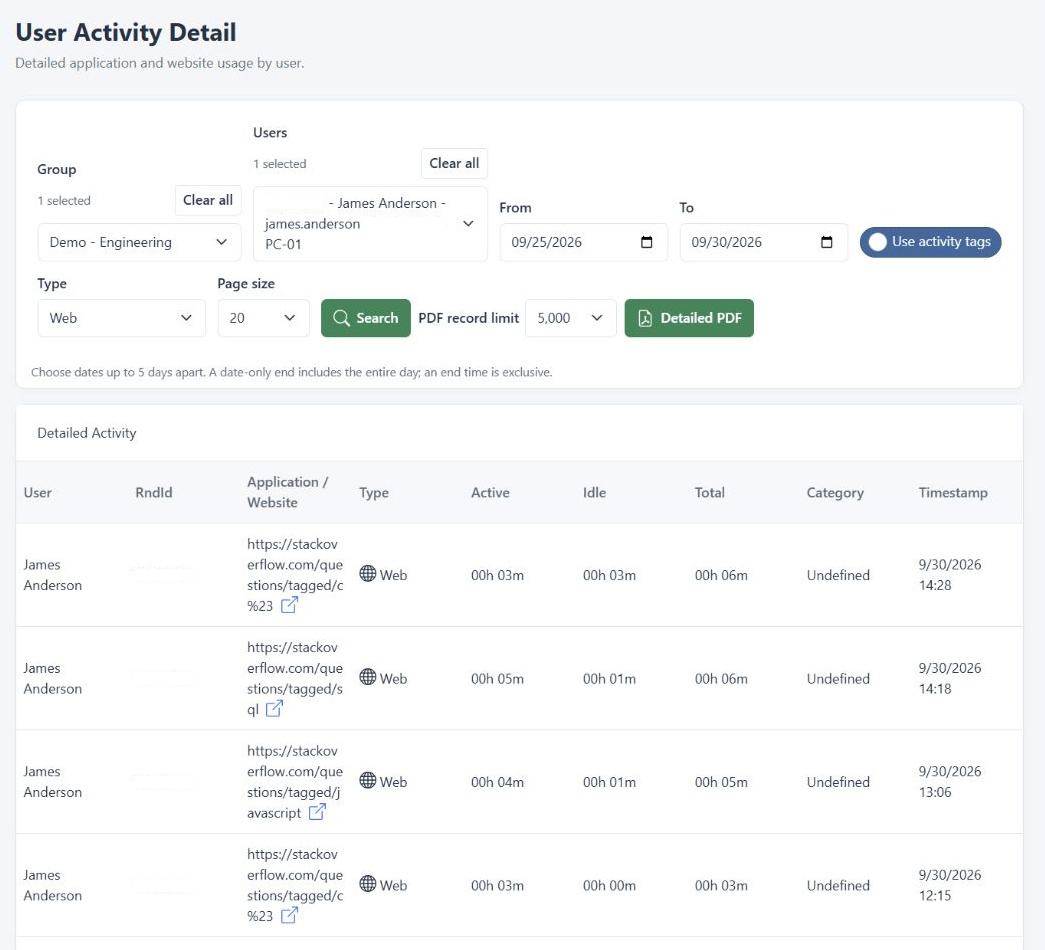
DeskGate's URL List presents recorded visited web addresses with user context. A full address can provide more detail than a domain name alone, allowing a reviewer to distinguish different destinations within the same service. That detail can be useful when determining whether several records relate to a business application, a reference resource, or a particular stage of a workflow.
An address is not the same as a complete record of the page contents or the user's intent. It does not automatically establish what someone read, entered into a form, downloaded, or sent to another person. Avoid making claims about message bodies or every interaction within an encrypted service based solely on a URL. The review must stay within the information actually present in the available records.
Likewise, do not assume that all browsers, all operating conditions, or every moment of internet use are covered simply because some records are visible. Confirm the installed environment, collection configuration, and relevant device coverage with the administrator. A sound report describes the records available for its defined scope rather than presenting a partial observation as a universal history.
Distinguish browser use from website use
A browser is an application through which people access many different services. Its application usage can include work in a customer portal, an internal document system, training material, or other sites. Reviewing the browser's application total alone does not tell you which of those activities occurred. Use the website view when the business question requires that distinction.
The reverse distinction matters as well. A visited address does not necessarily explain the full duration shown for the browser application. Different report views may use different measurements, aggregation rules, or event types. Read their labels and definitions before comparing figures. Do not subtract a URL total from an application total and label the difference as unexplained personal use without establishing that the quantities are comparable.
When preparing a summary, identify the measurement explicitly. A count of records, a usage duration, and a category share answer different questions. Use the original report terms and state the relevant period. This helps readers avoid interpreting frequent visits as long visits or assuming that an application duration reveals the amount of work completed inside an online service.
Use Work Analysis to set the initial context
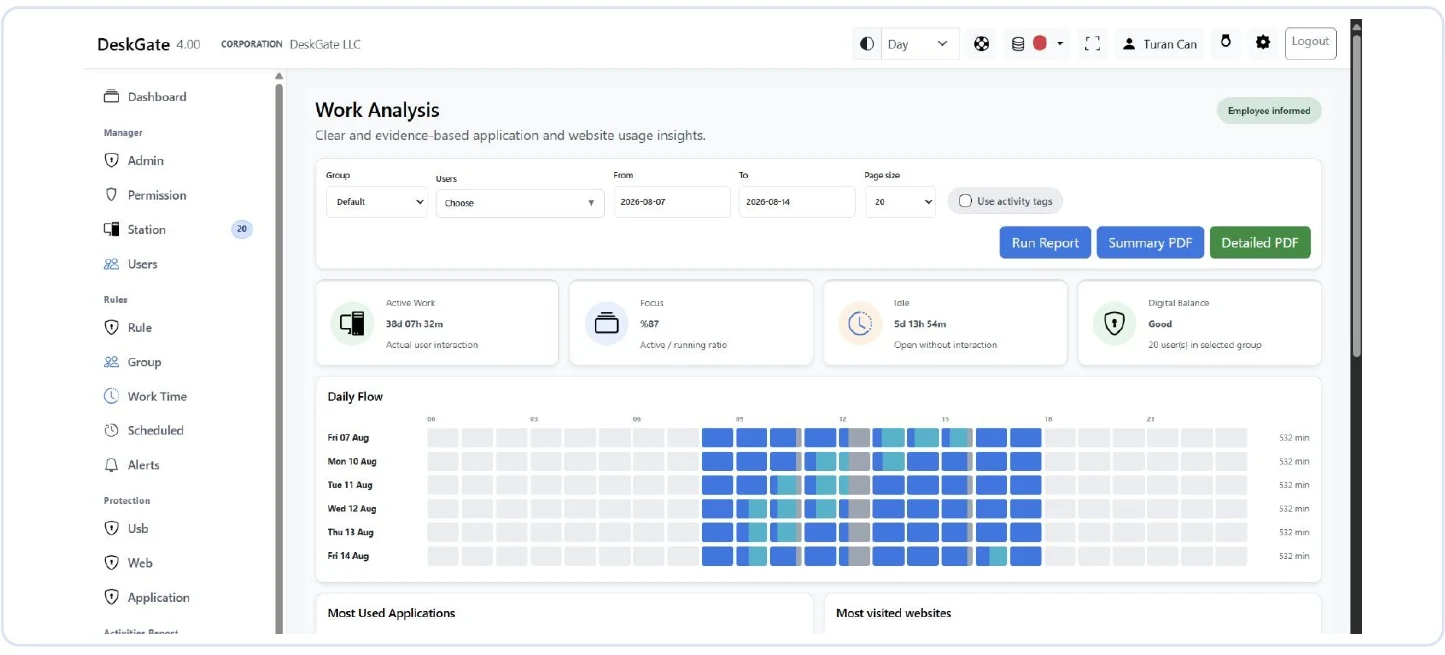
In Work Analysis, select the Group, intended Users, and From and To dates before running the report. Choose the appropriate page size and use Run Report to apply the selection. Check the resulting scope rather than assuming that a changed field has already refreshed the displayed data. A previous user's result can otherwise be mistaken for the current selection.
Start with a limited interval that includes a known activity. Confirm that the expected user and recognizable business service appear where you would expect them. Then examine the website section in relation to the application and daily usage views. This initial check provides a practical way to detect a mistaken date range or identity before investigating more detailed browsing records.
Keep the first result focused on the original question. If it raises a separate issue, record that issue for an appropriate follow-up instead of automatically extending the review to every available person. Clear boundaries make the eventual finding easier to explain and reduce the amount of unrelated information copied into reports or shared with people who do not need it.
Move from an overview to individual addresses
Use a summarized view to identify where a closer look is justified, then examine relevant URL details. DeskGate's URL Chart provides a way to review the pattern of visited web resources, while URL List exposes recorded address detail. Check the labels of the installed view so that you understand whether a displayed figure concerns counts, usage, or another defined measure.
Choose a narrow set of records that can explain the pattern you noticed. Look at the associated user and period, and identify whether several addresses belong to the same business service. An authentication page, document page, and application landing page may be related parts of one workflow rather than three independent activities. Keep that possibility open until the service owner or user context resolves it.
Do not convert a visually prominent item into a conclusion without checking its basis. A frequently occurring domain may be important to everyday work, while a less frequent destination may be relevant to the specific question. Prioritize by the purpose of the review rather than the size of a chart entry alone. The overview directs attention; the details and context support interpretation.
Interpret classifications without guessing
Classification helps organize large amounts of usage information, but the category is only useful when its meaning is understood. In Work Analysis, an Undefined classification is a reason to seek context. It should not silently become a label for personal, prohibited, or unproductive activity. Preserve that uncertainty in the report until an authorized decision establishes the appropriate interpretation.
Consider the employee's role and the specific task. A service used for recruiting, marketing, customer research, or technical support may look different from the tools used by another department. The same domain can have several legitimate uses. A classification approach that ignores those differences can produce misleading comparisons even when the underlying usage records are accurate.
When your organization reviews a classification, document the reason and the scope of the decision in its normal process. Distinguish a business judgment about the service from a verified technical change in the reporting environment. Do not imply that a discussion automatically changes every historical result or that the software independently understands every department's business purpose.
Handle detailed addresses with care
Full URLs can contain paths, document identifiers, search terms, or other information that is unnecessary for a broad management summary. Before sharing an address-level export, consider whether a service-level explanation would answer the question. The aim is to communicate the relevant finding while avoiding an unnecessary copy of unrelated detail from the browsing record.
Do not open unfamiliar addresses indiscriminately during a review. Some links can depend on a user's session, refer to private resources, or lead to an untrusted destination. Use your organization's approved investigation process when a destination needs technical examination. The address already recorded in the report may be sufficient to establish the next step without visiting the site from a reviewer's workstation.
Use controlled storage for working notes and exported documents. Avoid pasting full browsing histories into general chat channels or widely shared presentations. If another reviewer needs evidence, provide the relevant scope and a clear explanation of its purpose. Retention and access for these materials should follow the organization's established process rather than being decided informally each time a report is generated.
Check dates and coverage before comparing periods
Choose periods that can reasonably be compared. A week containing a major training session, a holiday, or a different set of users may produce a different pattern without indicating a change in normal behavior. Record those conditions before calculating differences. The most useful comparison keeps the question, user scope, and measurement basis consistent enough for the result to be interpreted.
Check the time basis when the team or service spans locations. Browser-related reference records and DeskGate reports may present times differently. An apparent missing event near a day boundary can result from comparing different time interpretations. Use explicit dates and known reference activity to investigate this possibility before concluding that collection failed or that a user did not access the service.
Review device coverage as well. A newly enrolled station, a connection interruption, or a change in collection settings can reduce the available observations for one period. Do not label that reduction as an improvement in internet use unless the evidence supports that conclusion. Separate changes in the amount of recorded data from changes in the underlying workflow you are trying to understand.
Separate observed use from access restrictions
Usage reporting explains what appears in the recorded data. It should not be confused with proof that a website is allowed or blocked under the current policy. When a question concerns access restrictions, inspect the relevant policy and allowed or restricted URL information with the responsible administrator. A historical record does not by itself establish the rule that applies now.
Similarly, an absent usage record does not prove that a destination was blocked. The user may not have visited it within the selected scope, the relevant activity may be outside the collection period, or the chosen report may not contain the expected data. Work through those alternatives before changing access settings. A policy change based on an incorrect assumption can disrupt a legitimate business process.
If a restriction needs adjustment, route the request through the organization's normal approval and technical process. State the business need, affected users, and observed behavior clearly. Verify the outcome with a limited, authorized check after the change. Keep the reporting observation and the configuration action documented separately so that future reviewers understand what was seen and what was changed.
Investigate gaps and surprising patterns methodically
When a familiar website is missing, first confirm the user, group, dates, and applied filters. Check whether the record belongs to another device or account involved in the same task. Then review the relevant collection coverage and permissions with the administrator. A narrow check using a known event is more useful than repeatedly expanding the range without understanding the original selection.
For an unexpected domain, ask what part of the workflow could explain it. Authentication, embedded resources, or different addresses within a service can complicate interpretation, but do not assume a particular explanation without evidence. Discuss the relevant task with the appropriate owner and inspect only the records needed to test that explanation. Keep unresolved possibilities distinct from confirmed findings.
If the issue needs support, describe the report, dates, user scope, expected result, and observed result. Include the installed version and relevant device context through the approved channel. Share only the browsing details necessary to investigate the issue. This gives support a reproducible question while reducing the chance that an entire employee history is distributed for a problem involving one record.
Prepare an export that matches the audience
Work Analysis offers Summary PDF and Detailed PDF outputs. Choose the format that supports the review question, then confirm the current user and date selection before generating it. A high-level discussion may need the summary rather than detailed address records. A technical investigation may require a smaller, more specific set of details with an explanation of why those records matter.
Review the PDF record limit when generating a detailed output. The document may be limited and should not be described as a complete record of all events if that is not what was exported. Open the file and compare the selected people, period, and a known result with the on-screen report. This check helps catch a stale selection or an unintended scope before the document is shared.
Include a short explanation of the finding and its limits when presenting the export. State whether the information establishes use of a service, suggests a workflow question, or requires further investigation. Avoid attaching a large document and expecting its recipients to infer the same context you had while reviewing the interface. The explanation is part of making the data useful.
Connect the finding to a measured improvement
A useful internet usage review ends with an appropriate action. If a team is struggling to find information, the next step might be clearer documentation or training on an approved service. If the issue concerns access, the technical team may need to examine the relevant configuration. If the records are incomplete, the immediate action is to resolve coverage rather than judge the people represented by the partial result.
Evaluate a change against the business question that started the review. Keep the user scope and measurement basis consistent, and check the work outcome through the organization's own operational records. Reduced browsing time is not automatically a success if the task became harder or the necessary research moved elsewhere. The objective is a better supported workflow, not simply a smaller number on a chart.
Keep the review process current
Revisit the review scope when teams adopt new services, change responsibilities, or replace devices. A previously useful classification or selection can become misleading when the work changes. Maintain enough documentation for another authorized reviewer to understand the purpose, filters, and interpretation without needing to reconstruct the entire investigation from an exported file.
DeskGate employee internet usage monitoring is most effective when recorded addresses, report definitions, and business context are considered together. Use the available detail to answer a focused question, preserve uncertainty where the records do not establish an explanation, and communicate the next action clearly. This produces a practical reporting routine that supports decisions while keeping the observation within what the data actually shows.