DeskGate Help Center
DeskGate Remote Employee Monitoring Software
Plan remote employee monitoring with DeskGate: align users, dates, device connectivity and report coverage across distributed teams.
Remote employee monitoring software helps an organization understand computer activity when its employees work across different locations and schedules. The challenge is not simply obtaining a report. It is knowing which devices and tasks the report represents, whether the information is complete enough for the intended decision, and how the employee's working conditions affect the interpretation. A useful monitoring process answers a defined operational question while accounting for work performed away from the computer.
DeskGate combines computer management with application and web usage reporting, daily activity views, and available screen recordings. These capabilities can support distributed teams when they are introduced with a clear scope and a consistent review method. This guide concentrates on remote and hybrid work arrangements: computer assignment, connectivity, time interpretation, different job roles, and the practical steps required to use activity records in a productive discussion about how work gets done.
Define the question before selecting the measurement
Start by explaining what the organization needs to understand about remote work. The question might concern access to a business application, a recurring support problem, or whether a new workflow has changed the tools a team uses. Each question calls for a different combination of technical and operational information. A general request to measure productivity does not establish which activities matter or how a manager should interpret a period with little computer interaction.
Write the intended decision next to the question. If the organization is considering additional training, describe the process or tool that needs investigation. If it is checking a technical issue, identify the affected devices and period. This gives remote employee monitoring software a defined role in the work rather than making the availability of data the reason for collecting and reviewing it. It also helps employees understand the practical purpose of the information being examined.
Establish the authorized computer and user scope
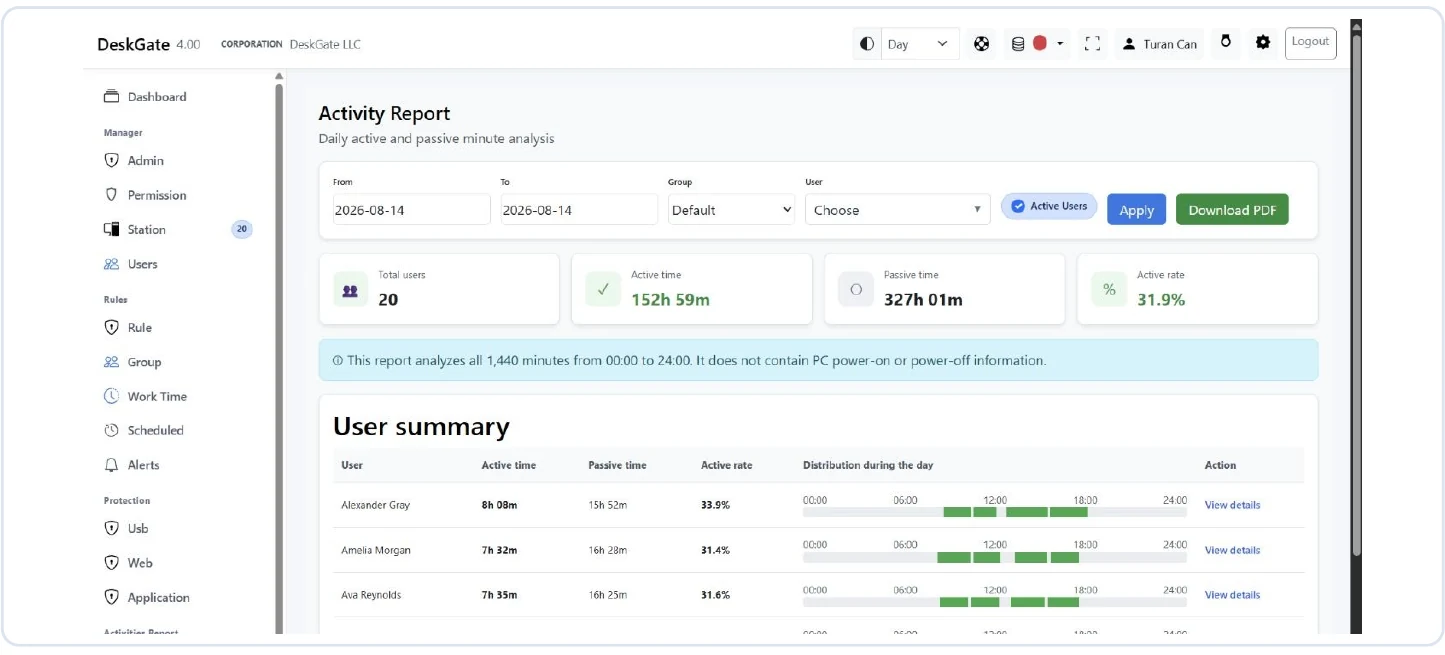
Remote work can involve a dedicated company laptop, a temporary replacement, or a workstation used on office days. Determine which computers are included in the organization's monitoring process and which accounts represent the relevant work. Keep the scope tied to the organization's actual device arrangements. A report from one managed computer should not be presented as a complete view of every activity a person performed across all devices and locations during the same day.
DeskGate's computer list helps administrators review device and user context, group membership, and last-seen information. Use that context to confirm that the selected records match the people and machines being discussed. A computer reassigned to another employee requires particular attention when reviewing historical dates. If a shared account makes attribution uncertain, resolve the assignment where possible and state the remaining limitation. Reliable remote reporting begins with dependable scope, not with a comparison of totals.
Explain the workflow to distributed employees
A remote employee may have fewer informal opportunities to ask how a new reporting process works. Provide a clear explanation of which work devices are included, what categories of information are reviewed, who is responsible for the process, and how an employee can raise a question. Explain the business purpose in terms that match the actual implementation. A detailed technical description is less useful than an accurate account of what the organization intends to do with the information.
Keep that explanation available when employees join a team or change their working arrangement. The process should also allow employees to report device changes, connection problems, or work that occurred outside the monitored computer. Those reports are valuable context for interpreting the technical record. They do not replace verification, but they can reveal an incorrect assumption before it influences a management decision. Clear communication and a practical correction route are part of maintaining trustworthy information.
Treat connectivity as a data quality condition
Distributed computers may connect under different network conditions. A recent last-seen value and a complete historical report are related but distinct observations. A device can be reachable now while an earlier period remains uncertain. Conversely, an old last-seen value should prompt a technical check before anyone concludes that the employee was absent or inactive. The network path, device state, account selection, and reporting period all need to be considered.
Do not assume that every component stores every type of activity while offline and later transfers it without gaps. Verify the behavior of the installed version and the applicable configuration for the information being used. When a connection problem has occurred, check a known user and a short period after service is restored. Distinguish successful current reporting from any unresolved historical gap. This prevents a technical interruption from becoming an unsupported statement about an employee's contribution.
Align dates across locations and working hours
Remote teams may describe the same event using different local dates or times. A manager reviewing a report in one location may search a different day from the employee who experienced the event elsewhere. Establish how the relevant DeskGate view presents time in the installed environment. Do not assume that every display automatically uses the employee's local time or that every report handles day boundaries in the way a reviewer expects.
Use explicit start and end dates when sharing the findings, and include the organization's agreed time reference where needed. For work that crosses midnight, check how the relevant period is represented before treating a partial day as a complete shift. A consistent date convention is especially useful when comparing a usage report with a support request or an available recording. The aim is to make the scope reproducible, so another reviewer can inspect the same period without guessing what last night meant.
Account for more than one work computer
An employee may switch computers during repairs, travel, or a change in assignment. Low activity on an older machine can be explained by that transition rather than by a reduction in work. Establish the date on which the device arrangement changed and identify the computers relevant to each part of the review period. Current ownership information alone may not explain an earlier week, particularly when equipment has been reassigned quickly to keep a remote employee working.
Check how the selected report represents users and computers in the organization's environment. Do not presume that every device history is automatically combined into one complete personal timeline. If the review relies on more than one scope, explain the relationship between them rather than adding totals without checking for overlap. A clear device history helps support staff investigate technical gaps and helps managers distinguish a change in the measurement coverage from a change in the underlying work.
Read application usage in the context of the role
DeskGate Work Analysis supports group, user, and date selections for examining application and web usage. This can help a manager understand which tools appear in a team's computer activity. The same application may support different tasks for different roles, however. A browser can be used for customer work, internal applications, research, or administration. Its presence alone does not establish whether the activity advanced a particular task or whether that task was completed successfully.
Discuss the tools in relation to the team's responsibilities. If an unfamiliar application appears, first establish what it does in the workflow. An uncategorized entry should not automatically be interpreted as personal activity. Where a category or label has changed between review periods, explain that change before comparing the results. Application distribution is most useful when it helps identify tool needs, access difficulties, or process changes; it is less reliable when used as a shortcut to judging every minute of work.
Understand the Daily Activity report's time basis
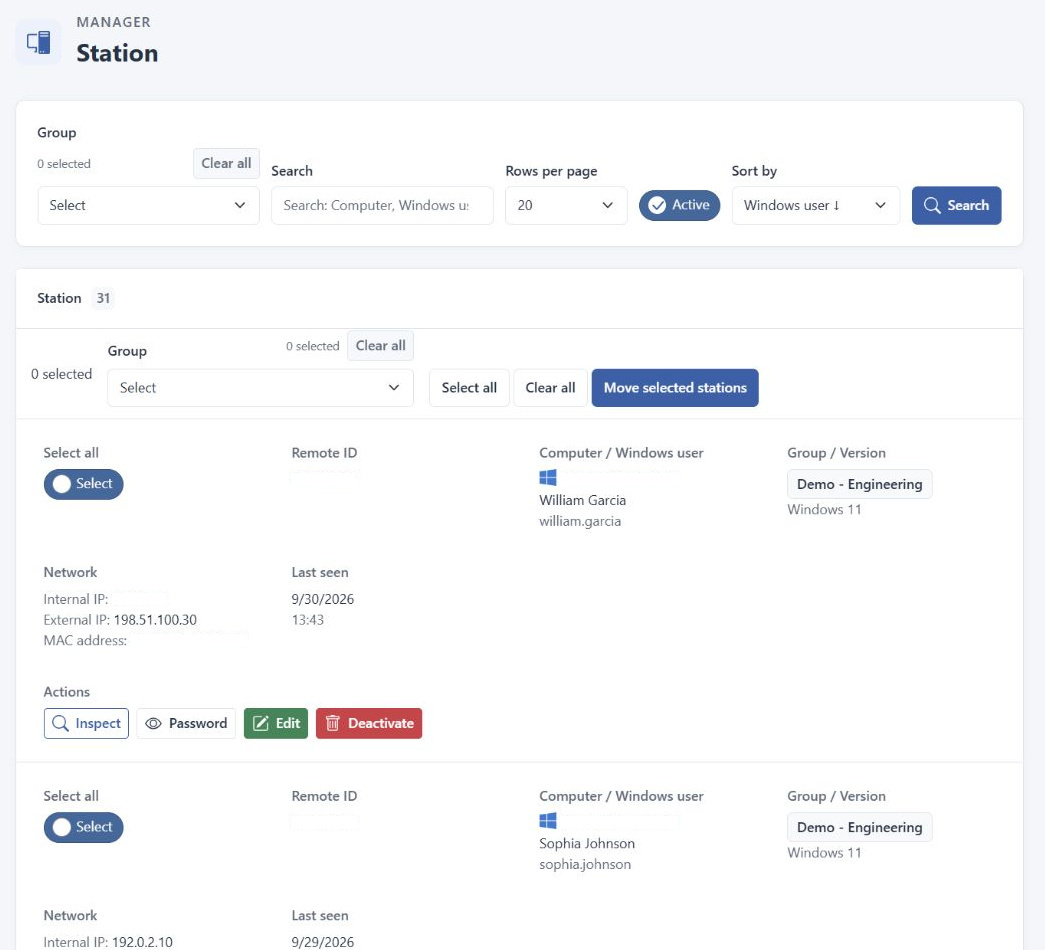
DeskGate's Daily Activity report covers the full 1,440 minutes of a day. Its documentation states that computer power-on and power-off information is not included. This matters when remote employees have different work schedules or spend only part of their day on the monitored computer. The report's idle time should not be read directly as lost working time, and its active proportion should not be treated as a score calculated only against contracted working hours.
Explain the time basis whenever the report is discussed with someone who has not used it before. A technical measure can be consistent and still answer a different question from the one a manager has in mind. Attendance, approved absence, task completion, and the quality of a deliverable require their appropriate operational sources. The activity report can help identify a pattern for further discussion, but it does not supply all of those facts simply because it contains a daily total.
Include meetings and work away from the keyboard
Remote work is not limited to typing and mouse movement. An employee may read a document, speak with a customer, participate in a meeting, or plan a complex piece of work without generating continuous interaction. Office days may include in-person discussions that create a different technical pattern from the same conversation held through a computer. These differences should be considered before treating a change in recorded activity as an improvement or deterioration in performance.
Ask what the work required during the selected period and use the organization's normal task information to understand the outcome. Computer activity can describe part of the environment in which the task occurred. It does not measure all reasoning, collaboration, or professional judgment. A review that includes those distinctions can identify unnecessary interruptions or tools that are difficult to use without pressuring employees to produce movement merely to make a report look busier.
Compare similar work under similar conditions
Comparing two teams requires more than selecting the same calendar dates. Their responsibilities, project stages, and required tools may differ considerably. A support group handling incoming requests and a specialist preparing a long document are unlikely to produce identical application patterns. Decide which aspects are actually comparable and explain the rest as context. A universal ranking based on one technical total can hide the differences that management needs to understand.
The same care applies when comparing one team's performance across two periods. Check the number of users, device coverage, work volume, holidays, and changes in tool classification. A period with incomplete data is not a reliable baseline for claiming an improvement. If the question concerns a new workflow, identify the expected effect and use comparable periods to investigate it. This makes the comparison a test of a defined operational idea rather than an attractive percentage without a dependable basis.
Distinguish asynchronous work from a coordination problem
Distributed teams do not always need to perform all tasks at the same time. Different activity windows may reflect an agreed schedule or a workflow in which one person's output is handed to another later. Remote employee monitoring software can show parts of that computer usage pattern, but the pattern alone does not establish whether collaboration is effective. Determine whether the necessary handoffs, responses, and deliverables occurred through the organization's established work process.
If coordination is failing, describe the specific dependency that is affected. A delayed handoff calls for a different response from a technical access problem or an unclear responsibility. Review the relevant activity only to the extent that it helps explain the issue. An employee being active at a different hour is not, by itself, evidence of disengagement. Keeping the discussion tied to the work allows the team to adjust communication and responsibilities without forcing unrelated roles into an identical daily pattern.
Use screen recordings for specific remote support events
When a remote employee reports an application error, a visual record may help establish what was displayed and which steps preceded it. Begin with the user, computer, and approximate time, then determine whether a current support session or an available historical recording is appropriate. A live connection examines the present state. A historical recording depends on the recording conditions during the event and on the continued availability of the relevant files.
DeskGate's recording view supports group, user, and date filtering. Keep the search focused on the event being investigated and verify that the selected record matches the expected context. Enabling recording later does not create earlier footage. If no recording is available, state that limitation and continue with the technical sources that do exist. The absence of an image does not establish the absence of work, and a visible application does not prove productive use throughout the entire displayed period.
Prepare reports that another person can interpret
A shared report should make its scope clear before the recipient starts comparing figures. Identify the users or group, the dates, and the operational question. DeskGate Work Analysis offers summary and detailed PDF output options, with a record limit that should be checked when preparing an export. Choose the output that suits the question, then verify a known record in the file. A detailed export should not automatically be described as an unlimited copy of every available record.
Use a descriptive document name and explain any known gaps, changes in device coverage, or category adjustments. Sharing a number without those conditions can give it a meaning the original reviewer never intended. Keep distribution limited to the people who need the report for the stated purpose. For a distributed team, a short written explanation of the scope often prevents more confusion than adding further pages of technical detail that recipients have no reason to examine.
Give employees a practical correction route
An employee may know that the wrong device was selected, that a replacement computer was used, or that a task took place outside the recorded environment. Create a straightforward way for that information to reach the person responsible for the review. Ask for the relevant date, device, and task context instead of requiring a broad personal explanation. These details allow the administrator or manager to check the specific issue against the available records.
If the correction changes the scope or interpretation, regenerate the report where appropriate and inform the people who received the earlier conclusion. Keep unresolved points visible until the necessary check has been completed. Listening to context does not mean accepting every explanation without examination; it means treating the report as information that can be verified and corrected. A reliable remote reporting process must handle disputed or incomplete records as carefully as it handles an apparently straightforward result.
Test the process under representative working conditions
A pilot should include the working conditions the organization actually needs to support. Testing only a conveniently connected office computer may not reveal the questions that arise for remote staff, temporary devices, or employees who move between locations. Select an authorized group and use a known period to check device assignments, reporting filters, time interpretation, and the availability of the required information. The aim is to understand what each view represents, not to make every participant produce the same pattern.
Document which questions the pilot answered and which conditions still need investigation. Separate a technical problem from a disagreement about the meaning of a metric. After making an adjustment, repeat the relevant check using the same scope. This gives the organization a practical basis for broader use. It also provides managers with examples of the limits they need to explain, such as a full-day activity denominator or a missing historical record, before those details affect a consequential decision.
Revisit the baseline when the work changes
Remote and hybrid arrangements evolve as teams change projects, devices, and schedules. A reporting method that was useful for one workflow may need a different scope after a reorganization. Review the intended question when those changes occur. Confirm that the selected users, devices, tools, and periods still match the work being discussed. Keeping an old baseline without acknowledging changed conditions can make a sensible operational transition look like an unexplained change in employee behavior.
Use the first period under a new arrangement to establish the relevant context, then compare later periods with that understanding in place. Continue to check technical completeness and seek feedback from the people doing the work. DeskGate remote employee monitoring software is most useful when its reports support specific questions about tools, workflows, and computer activity. Accurate scope, clear time references, and thoughtful interpretation allow those reports to contribute to decisions while preserving the distinction between recorded activity and the complete value of a person's work.