DeskGate buyer guide
Employee Monitoring Software Evaluation Checklist
Use practical questions and demonstration evidence to evaluate reports, permissions, security, deployment and licensing.
By DeskGate · Published October 5, 2026
 Concept illustration. Original DeskGate interface example appears below.
Define the decision before the demo
An employee monitoring software evaluation is stronger when each requirement has an owner and an observable acceptance test. Begin with the business questions you need to answer: reviewing application usage, understanding reported interruptions, tracking assets or investigating authorized security events. A long feature list alone cannot establish whether a tool fits your workflow.
Record your endpoint count, supported operating systems, reporting groups, intended reviewers and deployment model. Separate required capabilities from optional ones. Define the collection scope and internal review process before enabling detailed evidence features.
Bring this checklist to your evaluation
Suggested evidence for an employee monitoring software evaluation.| Area | Ask or demonstrate | Record as evidence |
|---|
| Reports | Filter a report by the intended user or group and period; open the supporting detail. | Report name, filters, time zone and a representative result. |
|---|
| Access control | Use a restricted reviewer account and confirm its permitted scope. | Role, allowed actions and an example of denied access. |
|---|
| Collection scope | Show which recording or activity features are enabled and for which devices. | Configuration, internal owner and agreed review purpose. |
|---|
| Data handling | Explain storage locations, retention, exports and backup responsibilities. | Data categories, locations and an approved operating plan. |
|---|
| Encryption | Identify connection protection separately from stored-field, disk and backup protection. | Product version, active settings and the scope of each control. |
|---|
| Audit and SIEM | Distinguish source events, administrative history and detection alerts. | One traceable example and the investigation owner. |
|---|
| Support and inventory | Trace a device or user into the relevant asset and support records. | Device scope, report permissions and the demonstrated workflow. |
|---|
| Deployment | Install a representative pilot and verify connections and reporting. | Compatibility, dependencies, installation effort and issues. |
|---|
| Capacity and recovery | Measure sample data growth and demonstrate the planned recovery procedure. | Storage estimate, backup owner and restoration result. |
|---|
| License and exit | Confirm included capabilities, support terms and available export formats. | Written package scope, costs and exit arrangements. |
|---|
Evaluate reports with real screens
DeskGate’s dashboard gives an overview of administration, licensing and support activity. Use it to orient the demonstration, then move to the specific activity or management report that answers your question. Sample counts in a screenshot are demonstration data, not a capacity guarantee or customer outcome.
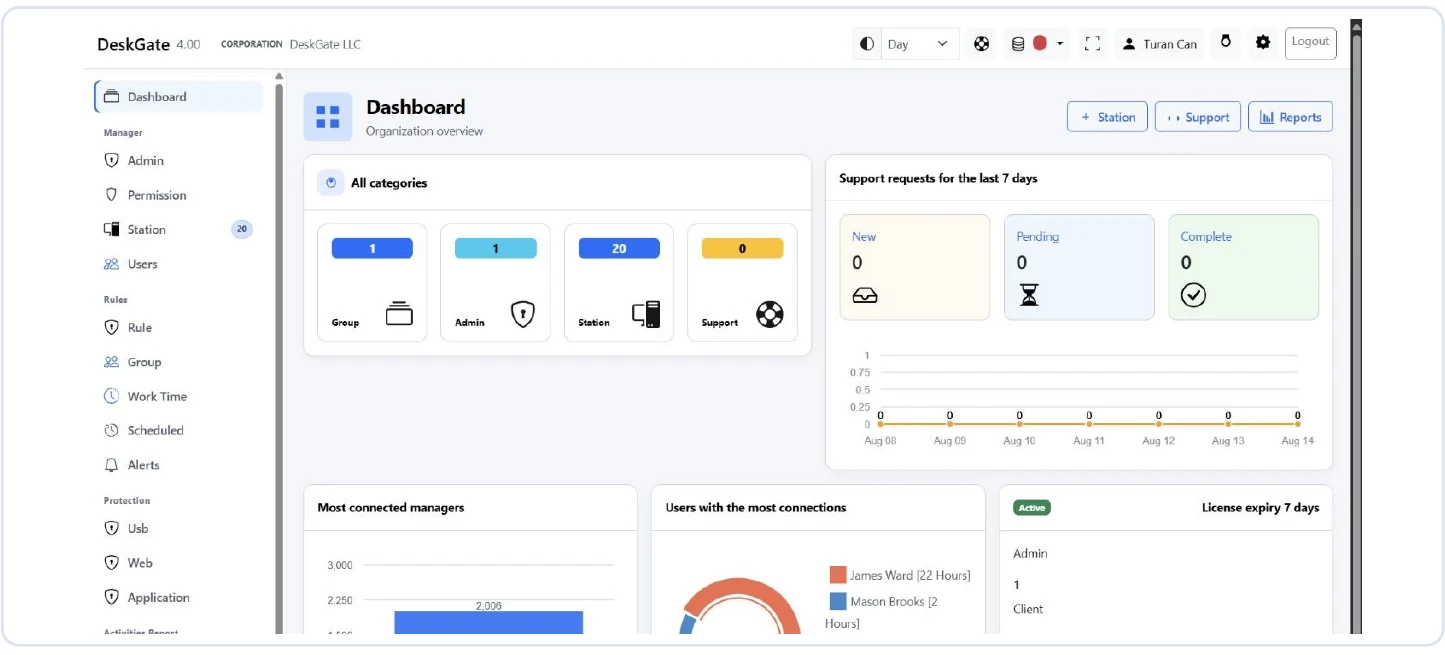 Original DeskGate dashboard for a guided product evaluation. Open the image for the original view.
Ask the presenter to change the date range or selected group and explain the effect. Review active and idle time alongside meetings, offline work and device availability. A recorded activity metric should not be treated as a complete measure of a person’s contribution. The reports guide explains the report families and a repeatable review process.
Cover the complete platform without assuming package coverage
For a DeskGate review, consider Dashboard, Manager, Rules, Protection, Data Security, Activities Report, Combined Reports, Support, Support Report, Inventory, Installation, Security Monitoring, Audit, SIEM, Integrations and Settings. Mark each area as required, optional or outside the evaluation scope.
For every required area, ask which license and version provide it and demonstrate the relevant workflow. An integration label does not by itself establish compatibility with a particular third-party product. Request documentation for the exact integration being proposed.
For cryptographic claims, ask what is protected and how the selected installation is configured. See the security and data protection guide for the distinction between connection protection, stored data, Audit and SIEM.
Use a simple evidence scorecard
For each requirement, record its priority, test owner, observed result and any follow-up question. Use three clear states: demonstrated, needs clarification and not supported in the proposed scope. Do not mark an item as passed solely because it appears in a brochure.
For example, “a department reviewer can open the agreed report for their assigned group” is testable. “The software improves productivity” is too broad without an agreed measurement method and contextual evidence. This example is an evaluation method, not a claimed customer result.
Resolve mandatory requirements before comparing optional conveniences. Have the technical owner confirm operational readiness and the purchasing owner confirm the written commercial scope.
Agree on the next step
Finish the pilot with a short decision record: which requirements passed, what remains unresolved, the proposed rollout scope and who owns ongoing operation. Use the deployment planning guide to turn that decision into installation and acceptance steps.
Should every available feature be enabled during evaluation?
No. Enable the features needed for the agreed pilot purpose and approved scope. Expand only when the relevant owners understand the collection, access and operational implications.
How do we compare different deployment models?
Use the same requirements and evidence standards. The self-hosted versus cloud comparison explains how operating responsibilities differ.
Evaluate DeskGate with your own requirements
Bring your endpoint count, deployment preferences and required report categories to a guided demonstration.
Request a guided demo