DeskGate practical guide
Hardware and Software Inventory Guide
Connect device, software and ownership records to support, asset planning and a practical inventory review.
By DeskGate · Published October 5, 2026
 Concept illustration. Original product examples are identified below.
Build a useful inventory, not just a device count
A hardware and software inventory connects the computers your organization operates with their recorded characteristics, installed software and responsible owners. Its value comes from helping IT answer a specific question: which device needs attention, what changed, or which record should a support request refer to?
DeskGate’s inventory offering includes Inventory Center, Stock Center and asset-related workflows. Evaluate the exact fields and operations available in the proposed version and license. This guide describes how to organize an inventory review; it does not promise that every suggested field is automatically discovered.
Separate hardware, software and ownership records
Suggested inventory review categories; confirm supported fields in your deployment.| Record group | Information to verify | Why it matters |
|---|
| Hardware | Recorded device identity, model and available component information. | Distinguish similar devices and plan investigation or replacement. |
|---|
| Software | Available application names and versions, with the relevant collection context. | Identify which installation a support or compatibility question concerns. |
|---|
| Ownership | Assigned person, group or operational owner where tracked. | Route support, handover and follow-up to the right team. |
|---|
| Stock and lifecycle | Available stock, assignment and retirement records. | Separate deployed equipment from available or retired assets. |
|---|
| Record freshness | When and how the record was obtained, where available. | Avoid interpreting old or incomplete observations as current state. |
|---|
Use the platform overview to scope the review
The DeskGate dashboard provides a central view of the environment and shows Inventory among the pictured license capabilities. Use this overview to start the demonstration, then ask to inspect the actual inventory and assignment records required for your workflow. The dashboard below is not an inventory-detail screen.
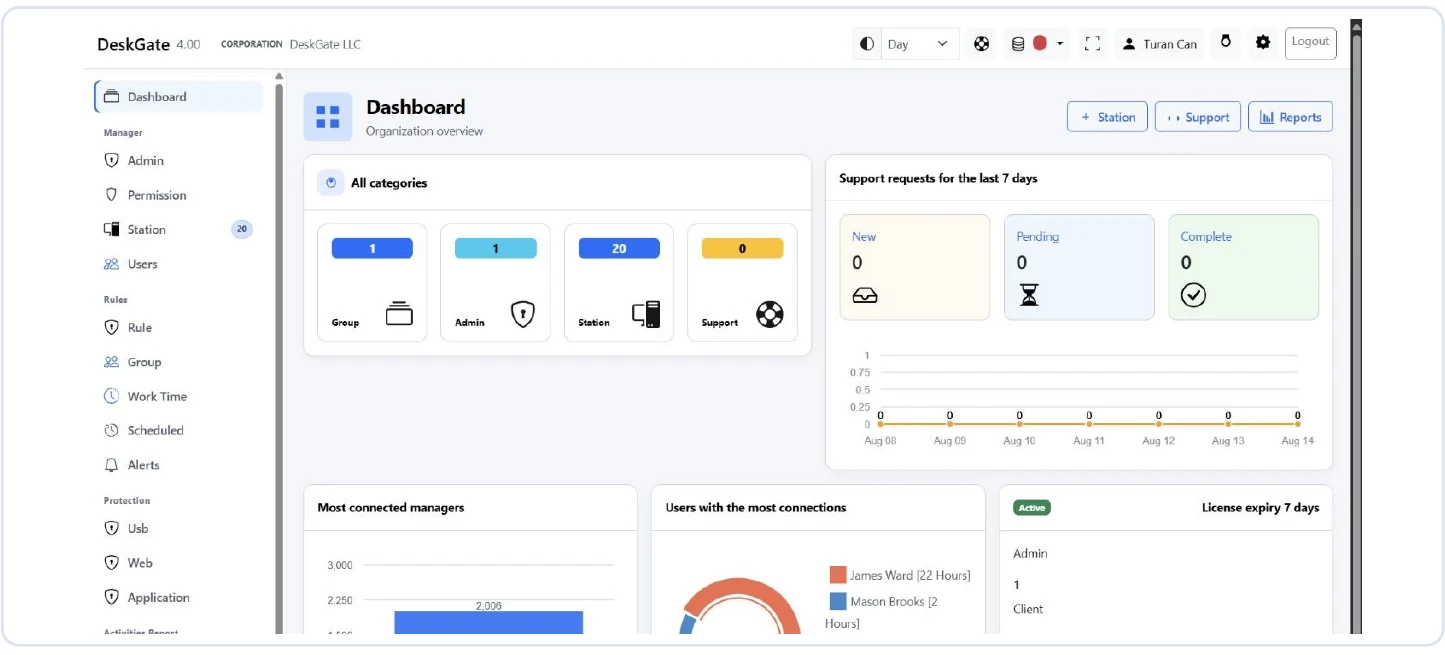 Original DeskGate dashboard showing the platform and license overview. Open the image for the original view.
Include Inventory, Support, Installation and Settings in a scoped product evaluation where relevant. The platform overview describes the wider categories; package coverage should be confirmed separately.
Apply inventory to everyday IT work
Support triage
Confirm which physical or virtual device the request concerns and review its available configuration. A display name alone may be ambiguous. Resolve mismatches before choosing a remote-support target.
Software review
Review the recorded application and version relevant to the issue. An inventory entry is not proof that software is patched, licensed correctly or free of vulnerabilities. Validate those questions using the appropriate evidence and process.
Planning and handover
Use verified records to prepare replacement discussions, assignments and stock reviews. Confirm the device’s real condition and owner before making a purchasing or retirement decision.
Keep the records dependable
- Define which devices and record categories belong in the inventory.
- Assign an owner for resolving missing or conflicting entries.
- Check freshness and collection behavior in a representative pilot.
- Record handovers and lifecycle changes through the agreed process.
- Review a sample against actual devices and investigate discrepancies.
Define how your team handles renamed, replaced, offline or retired devices. Do not silently treat every duplicate-looking record as the same asset. Restrict exports and detailed device identifiers to the people who need them.
Questions to bring to a demo
Ask which hardware and software fields are collected, how updates occur, what happens to offline devices and which records are maintained manually. Demonstrate one asset assignment and one support lookup using the proposed roles. Confirm export formats and retention behavior if those are requirements.
Does inventory provide software license compliance?
An application list alone cannot establish entitlement. Reconcile the relevant records with contracts and licensing terms through your own review process.
Can inventory help remote support?
Yes, reliable device context can help identify the right endpoint. Connection authorization remains separate; see Employee Monitoring vs Remote Desktop.
Use the deployment planning guide and evaluation checklist to turn these questions into pilot acceptance checks.
Continue your DeskGate evaluation
Request a guided demo